¶ Authorization Roles in FOLIO
Beginning with the Sunflower and Eureka releases, FOLIO transitioned from using permission sets to Authorization Roles. Roles provide more granular control over user permissions while making it easier to understand what access has been granted. For the MOBIUS Office, roles can also be centrally managed and distributed to member tenants.
Authorization Roles are organized into several levels:
- Applications are the highest level and represent functional areas of FOLIO. For example, app-bulk-edit contains the permissions related to the Bulk Edit application.
- Within each application are Capability Sets, which are roughly equivalent to the permission sets used in earlier FOLIO releases.
- Each capability set contains one or more Capabilities, which are similar to the sub-permissions found in the previous permissions model.
In most cases, administrators assign Capability Sets to a role. FOLIO automatically includes the individual Capabilities required by those capability sets, so they generally do not need to be assigned separately.
¶ Permission Types
Both Capability Sets and Capabilities define access using a combination of permission classes and permission levels.
¶ Permission Classes
Permissions fall into one of three classes:
- Data – Allows users to view or manipulate records and other data.
- Settings – Allows users to configure or modify application settings.
- Procedural – Allows users to perform specific actions or functions within an application.
¶ Permission Levels
Where applicable, permissions may grant one or more of the following levels of access:
- View – View information without making changes.
- Create – Create new records or resources.
- Edit – Modify existing records or resources.
- Delete – Remove records or resources.
- Manage – Full control, including all of the permissions above.
- Execute - For specific tasks with Procedural classes
Not every capability supports every permission class or permission level. FOLIO only displays the options that are applicable to a particular capability, so unavailable combinations simply do not appear.
The applications within FOLIO are listed here:
| Application Name | Recommendation | Role | Use |
| app-dcb | Do Not Use | OpenRS | OpenRS System |
| app-consortia | Do Not Use | Consortia | Consortial (ECS) use |
| app-consortia-manager | Do Not Use | Consortia | Managing Consortia (ECS) |
| app-reading-room | Assign as needed | Reading Room | Reading Room management |
| app-edge-locate | Only for API users | API | API access to Locate |
| app-acquisitions | Primary Use | Acquisitions | Using Acquisitions |
| app-bulk-edit | Primary Use | Bulk Edit | Bulk Edit use |
| app-edge-complete | Only for API users | API | API Access to FOLIO |
| app-fqm | Primary Use | FOLIO Query Machine | Lists/Queries |
| app-marc-migrations | Do Not Use | Marc Migration | Migrating Marc records into FOLIO |
| app-oai-pmh | Do Not Use | OAI/PMH | Record harvesting |
| app-platform-complete | Primary Use | Primary FOLIO Application | Most user functions in FOLIO |
| app-platform-minimal | Assign as needed | System Functions | Additional user functions |
| app-task-list | Assign as needed | Tasks | Using Tasks |
| app-edge-panorama | Only for API users | API | API access to Panorama |
Most users will primarily use “Platform Complete” with other applications as needed.
When viewing an application the Capability Sets and Capabilities will appear like this:
| Capability Set or Capabilities | ||||||
| Class | Application | Resource | Level | Level | Level | Level |
| Data | ||||||
| Application Name | Permission Name | View | Edit | Delete | Manage | |
| Settings | ||||||
| Permission Name | View | Edit | Delete | Manage | ||
| Procedural | ||||||
| Application Name | Permission Name | Execute |
Resource describes the permission and what area it is used in, such as “Organizations Settings” to manage the settings for Organizations.
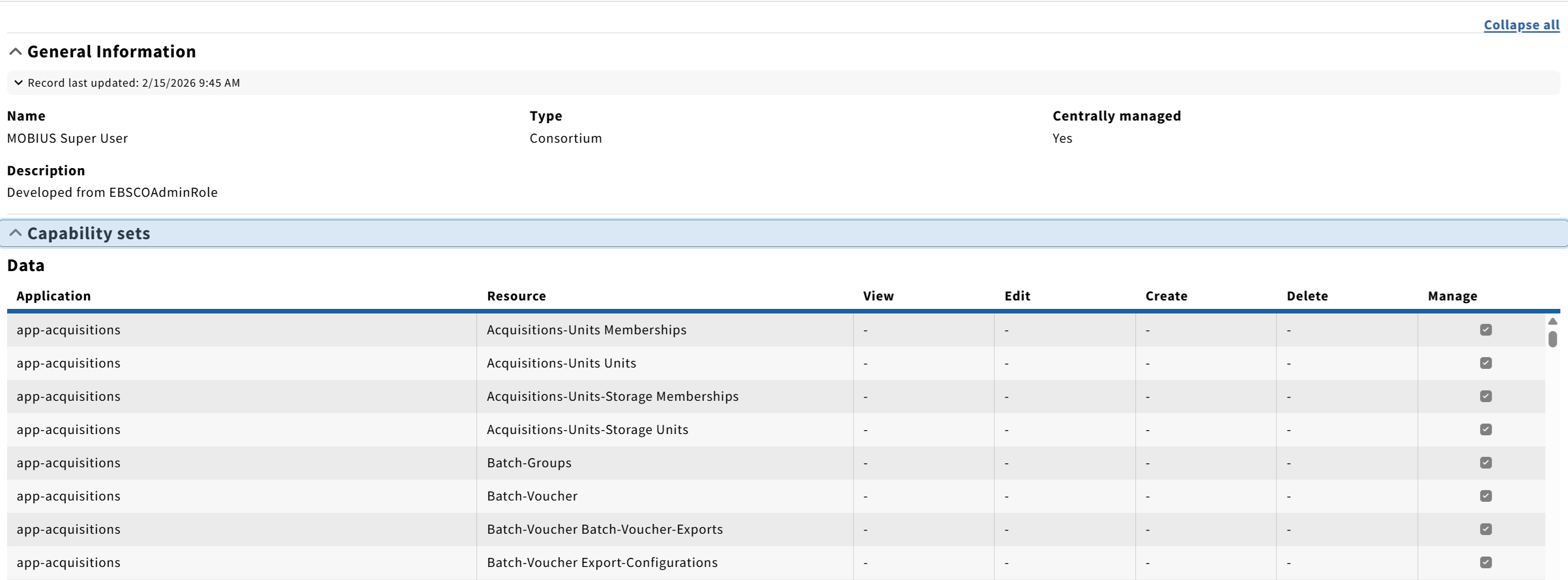
Roles are accessed within FOLIO by going to Settings and then Authorization Roles. When first viewing a Role the the Capability sets and Capabilities can be expanded:

When expanded the application will show, levels that have been selected will have a checkbox marked.
New Roles will prompt for which applications to select on creation:
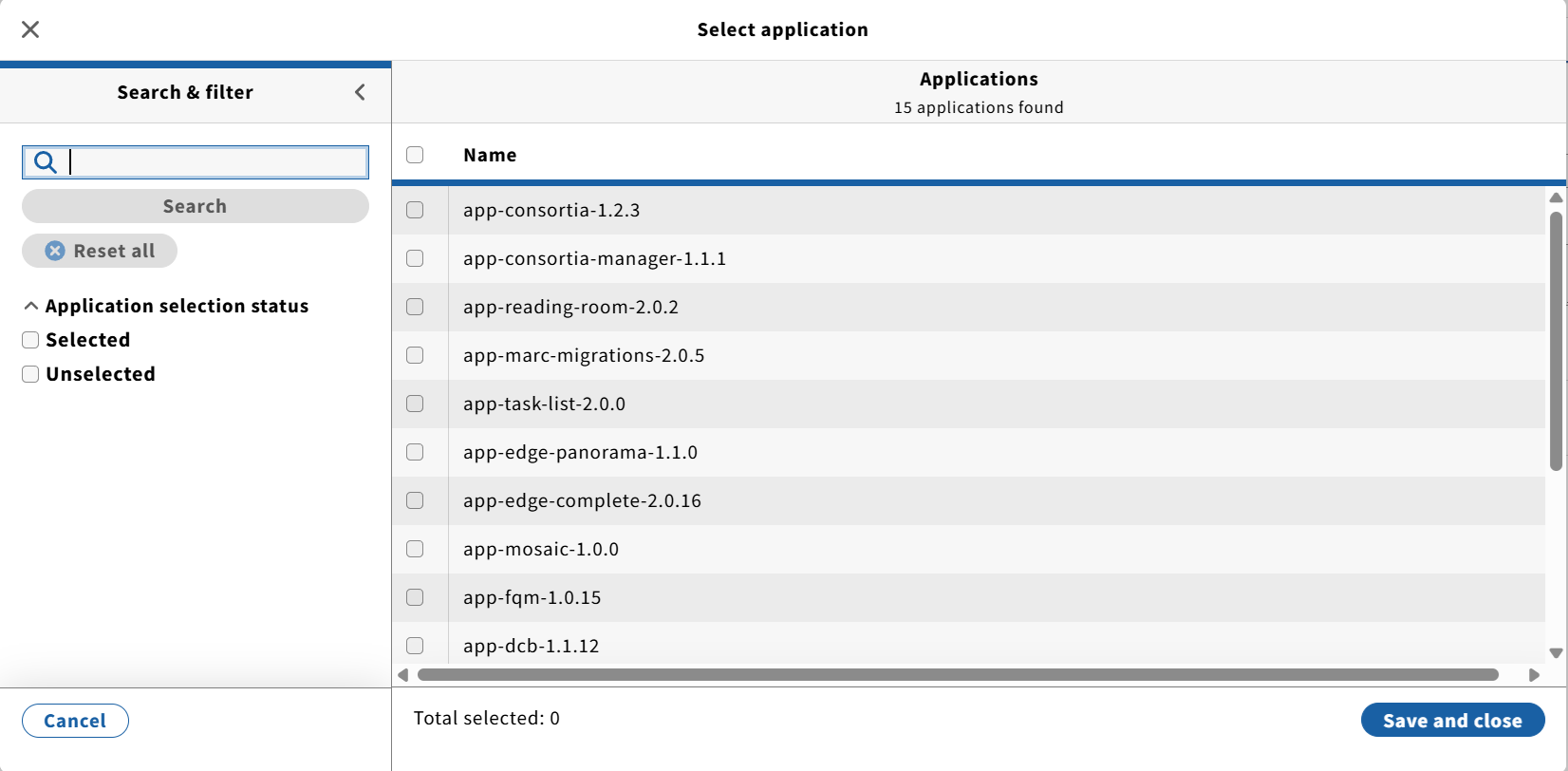
Existing roles can also have applications added.
In general it's more practical to copy and edit a role rather than make a new one from scratch. The old Ramsons permission sets were migrated to Roles and can still be used, but are not updated with new permissions available in Sunflower on up.
Libraries can create and edit their own Roles as needed. For libraries not wishing to do this MOBIUS supports four Authorization roles:
| MOBIUS Super User | A power role created from the Ebsco Admin role that can do all needed work on FOLIO except for consortial and some system settings | |
| MOBIUS Standard User | A role created from the Super User that can do all work but can't change passwords or settings | |
| MOBIUS Circulation Worker | A basic limited access role for checking materials in and out | |
| Shadow | A role to allow editing and updating consortial records by a shadow user, this is assigned by MOBIUS in the Central tenant | |
These are centrally managed by the MOBIUS office, meaning they can't be edited by libraries. The Super User/Standard User are made from the Ebsco Admin role. All four are updated as needed or when new permissions are available in a FOLIO release.