Document created as of the FOLIO Sunflower release.
¶ Suppressing on a Record-by-Record Basis
¶ Suppress from All Discovery (Locate/EDS/OpenRS)
¶ FOLIO
To suppress an individual Instance, Holdings or Item record from display in all discovery services (Locate, EDS, and OpenRS), use the Suppress from discovery check-box in the record editor.
- Login to FOLIO and enter the Inventory app (click Inventory or Apps > Inventory)
- Retrieve the record you wish to suppress
- To suppress an Instance record
- Open the Consortial holdings accordion and verify no other library has attached holdings
- Click the “reverse carrot” icon (V) to open the accordion
- If any libraries are listed under the Consortial holdings accordion, DO NOT SUPPRESS THE INSTANCE RECORD
- Click on Actions > Edit instance
- Check the box to the left of Suppress from discovery
- Click on the Save & close button
- Note that suppressing an Instance record will automatically suppress all attached Holdings and Item records
- Open the Consortial holdings accordion and verify no other library has attached holdings
- To suppress a Holdings record, from the Instance record display
- Click on the View holdings button to the right of the Holdings line you wish to suppress
- Click on Actions > Edit
- Check the box to the left of Suppress from discovery
- Click on the Save & close button
- Note that suppressing a Holdings record will automatically suppress all attached Item records
- To suppress an Item record, from the Instance record display
- Open the Holdings accordion to display the Item preview line
- Click the “reverse carrot” icon (V) to open the accordion
- Click on the barcode (or “No barcode”) link to display the Item record
- Click on Actions > Edit
- Check the box to the left of Suppress from discovery
- Click on the Save & close button
- Open the Holdings accordion to display the Item preview line
¶ Sierra
Record suppression in Sierra is done using fixed-fields on the bib and item level. The former “cluster” libraries used the BCODE3 field for bib suppression and the ICODE2 for item suppression. The values ‘s’ and ‘n’ were used to suppress records from all discovery platforms.
Systems using Sierra will want to check their fixed field settings and values for current usage.
¶ Polaris
¶ Alma
¶ Suppress from Display in OpenRS
To suppress an individual Instance record from display in OpenRS, a 998 field with the subfield t value 1 must be added to the MARC record. Non-MARC records cannot be suppressed using this method.
¶ FOLIO
- Login to FOLIO and enter the Inventory app (click Inventory or Apps > Inventory)
- Retrieve the record you wish to suppress
- Open the Consortial holdings accordion and verify no other library has attached holdings
- Click the “reverse carrot” icon (V) to open the accordion
- If any libraries are listed under the Consortial holdings accordion, DO NOT SUPPRESS THE INSTANCE RECORD
- Click on Actions > Edit MARC bibliographic record
- Scroll to the bottom of the record display
- Click on the “plus sign” (‘+’) on the line above the (greyed out) 999 line
- In the MARC tag field, enter
998 - In the variable data field, replace
$awith$t 1(note the space) - Click on the Save & close button
¶ Sierra
Record suppression in Sierra is done using fixed-fields on the bib and item level. The former “cluster” libraries used the BCODE3 field for bib suppression and the ICODE2 for item suppression. The value ‘z’ was used to suppress records from the union catalog.
Systems using Sierra will want to check their fixed field settings and values for current usage.
¶ Polaris
¶ Alma
¶ Suppressing Records via System Settings and Mapping
¶ FOLIO Libraries
¶ EDS and Locate: Location Lookup Table
Records can be suppressed in the library’s EBSCO Discovery Service (EDS) and local Locate catalog by Location code, via the Location Lookup Table which governs the display of Locations in the RTAC (i.e., the holdings display lines), the Location facet for search filter, and the Location search limits in Advanced searching.
Please contact the MCO Help Desk to request a copy of your current Location Lookup Table.
¶ How it Works
The table is an excel file, that looks like this:

Location_Code: The Location field as it appears in FOLIO. Although the column reads “code”, it is the Location name that appears in the column.
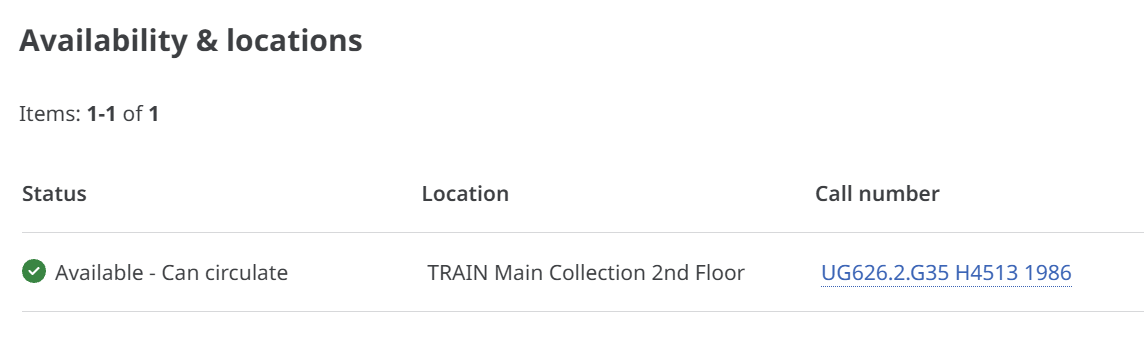
Copy_Display: The Location field as it displays in the EDS/Locate RTAC, or holdings display:
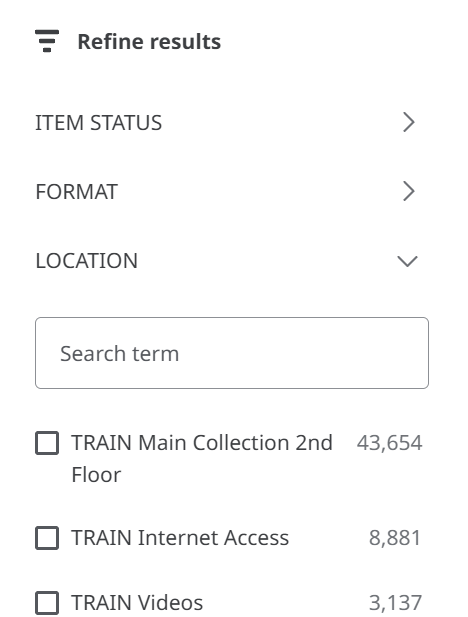
Facet_Display: The Location field as it displays in the Locate search facets (a.k.a, “refine results”):
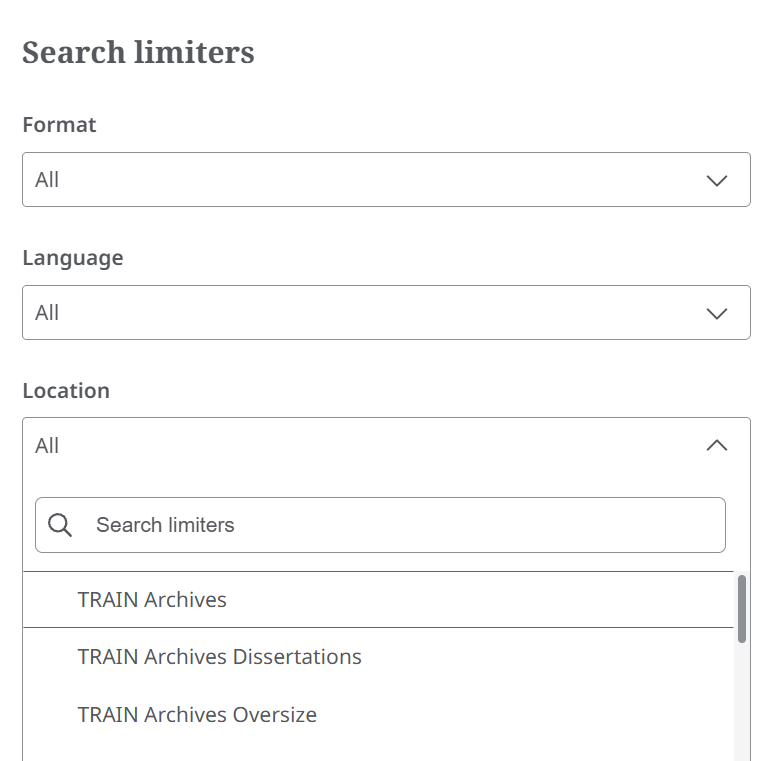
Limiter_Display: The Location field as it displays in the “Search limiters” in the Locate Advanced Search:
¶ Suppressing Locations
Locations can be suppressed from display in EDS and Locate by excluding them from the Location Lookup Table. Please contact the MCO Help Desk if you wish to make changes to your record display in EDS and Locate.
¶ EDS and OpenRS: OAI-PMH Settings
The OAI-PMH Settings in FOLIO determine whether non-MARC, as well as MARC, records are contributed to EDS and OpenRS. Most MOBIUS FOLIO libraries are set to contribute only MARC records. Please note that if your library contributes non-MARC records, you cannot make use of the 998 field to suppress individual non-MARC records.
MARC records in FOLIO are Instance records with a Source value of MARC. These Instance records are “backed” by a MARC record, which can be viewed by selecting Actions > View source, and/or edited by selecting Actions > Edit MARC bibliographic record.
Non-MARC records in FOLIO have a Source value of FOLIO. They may be viewed in the Instance display pane and edited by selecting Actions > Edit instance. (The options to View source and Edit MARC bibliographic record may appear in the Actions menu, but will be “greyed out” and not selectable.)
Note that non-MARC records contributed to OpenRS will be converted into a brief MARC record by OpenRS, so that the record functions correctly on that system.
To check and/or change your settings:
- Log into FOLIO and enter the Settings app (click Settings or Apps > Settings)
- Click on OAI-PMH
- Click on Behavior
- The key field is Record source
- Source records storage: Only MARC records are contributed
- Inventory: Only non-MARC records are contributed
- Source records storage and Inventory: Both MARC and non-MARC records are contributed
- Click the Save button to save changes
Note that if a change is made to contribute non-MARC records, records will need to be updated (suppressed, saved, unsuppressed, saved) in order to trigger an OAI-PMH harvest of the records.
¶ FOLIO, Sierra, Polaris, and Alma Libraries
¶ Location Mapping in OpenRS
Record Locations in OpenRS are mapped from local ILS Location values. Libraries and view their Location mapping via the DCB Admin for Libraries application.
- Open a browser and navigate to https://libraries-dcb-hub-admin-scaffold-uat-git-production-knowint.vercel.app/auth/login?callbackUrl=%2F
- Click on the Login button
- Log in with your access credentials. If you do not have access credentials, please contact the MCO Help Desk.
- Click on Mappings in the left hand navigation bar:

- Click on All reference value
- To view your Location mapping in DCB Admin, click on FILTERS. You may instead want to download a csv file of your mapping settings.
- Enter the following in the given fields
- Columns = From context
- Operator = equals
- Value = [your library] (see below for a list of Library values)
- Click on + ADD FILTER
- Enter the following in the given fields
- Columns = Category
- Operator = equals
- Value = Location
- Click anywhere on the window to hide the filtering pop-up
- The From value column lists the Locations (code value) that display in OpenRS
¶ Item Type Mapping in OpenRS
Local Item Types (Material Types in FOLIO) are mapped to either circulating or non-circulating in OpenRS. Item Types that are mapped to non-circulating in OpenRS do not appear in the RTAC (holdings line).
Note that this is not the same as the Format filter, which is mapped from the Leader byte 06.
To view whether the Item/Material Types for your library are mapped to circulating (display) or non-circulating (do not display), follow the above procedure for view Location mapping, except in Step 9.c., substitute “ItemType” for “Location”.
The From value column lists the Item (Material) Types for your library. The To value column lists whether the Item Type circulates (CIRC) or does not circulate (NONCIRC). NONCIRC Item Types do not display in the holdings lines (RTAC) of the record display.
¶ Downloading the OpenRS Mapping Table
- From the Mappings page in DCB Admin, click on EXPORT, then click on either Export all as CSV or Export all as TSV (the file will automatically download)
- Open the TSV or CSV file in your preferred spreadsheet program (Excel, Google Sheets, etc.)
- Note that ALL mappings for ALL libraries are included in the file
- Filter by fromContext to limit the display to your library (see below for OpenRS library values);
- Filter by fromCategory to limit the display to Locations, itemTypes, or patronTypes
¶ Making Changes to OpenRS Mapping
If you want to change the Locations of Item Types that display in OpenRS for your library, please open a ticket with the MCO Help Desk.
¶ OpenRS Library Values
| Altoona Public Library | ALTOONA |
| A.T. Still University | AT_STILL |
| Avila University | AVILA_UNIVERSITY |
| Benedictine College | BENEDICTINE_COLLEGE |
| Calvary University | CALVARY_UNIVERSITY |
| Central Arkansas Library Systems | CALS |
| Central Methodist University | CENTRAL METHODIST UNIVERSITY |
| Columbia College | COLUMBIA_COLLEGE |
| Conception Abbey & Seminary | CONCEPTION |
| Cottey College | COTTEY_COLLEGE |
| Covenant Theological Seminary | COVENANT_THEOLOGICAL_SEMINARY |
| Crowder College | CROWDER_COLLEGE |
| Culver-Stockton College | CULVER_STOCKTON_COLLEGE |
| Drury University | DRURY_UNIVERSITY |
| East Central College | EAST_CENTRAL_COLLEGE |
| Evangel University | EVANGEL_UNIVERSITY |
| Goldfarb School of Nursing | GOLDFARB_NURSING_BARNES_JEWISH |
| Hannibal-LaGrange University | HANNIBAL_LAGRANGE_UNIVERSITY |
| Harris-Stowe State University | HARRIS_STOWE |
| Jefferson College | JEFFERSON_COLLEGE |
| Kansas City Art Institute | KANSAS_CITY_ART_INSTITUTE |
| Kansas City University | KANSAS_CITY_UNIVERSITY |
| Kansas City Kansas Community College | KC_KANSAS_COMMUNITY |
| Kenrick-Glennon Theological Seminary | KENRICK-GLENNON |
| Lincoln University | LINCOLN_UNIVERSITY |
| Lindenwood University | LINDENWOOD_UNIVERSITY |
| Logan University | LOGAN_UNIVERSITY |
| Maryville University of Missouri | MARYVILLE_UNIVERSITY |
| Metropolitan Community College | METROPOLITAN_COMMUNITY_COLLEGE |
| Midwestern Baptist Theological Seminary | MIDWESTERN_BAPTIST |
| Mineral Area College | MINERAL_AREA_COLLEGE |
| Missouri Baptist University | MISSOURI_BAPTIST_UNI |
| Missouri Botanical Garden | MISSOURI_BOTANICAL_GARDEN |
| Missouri History Museum | MISSOURI_HISTORY_MUSEUM |
| Missouri River Regional Library | MISSOURI_RIVER |
| Missouri Southern State University | MISSOURI_SOUTHERN_STATE_UNIVERSITY |
| Missouri State Library | MISSOURI_STATE_LIBRARY |
| Missouri Valley College | MISSOURI_VALLEY_COLLEGE |
| Missouri Western State University | MISSOURI_WESTERN_STATE_UNIV |
| Moberly Area Community College | MOBIUS_AREA_COMMUNITY_COLLEGE |
| Nazarene Theological Seminary | NAZARENE_THEOLICAL_SEMINARY |
| North Central Missouri College | NORTH_CENTRAL_MISSOURI_COLLEGE |
| Northwest Missouri State University | NW_MISSOURI_STATE |
| Ozark Christian College | OZARK_CHRISTIAN_COLLEGE |
| Ozarks Technical Community College | OZARKS_TECHNICAL |
| Park University | PARK_UNIVERSITY |
| Rockhurst University | ROCKHURST_UNIVERSITY |
| Saint Louis Art Museum | SAINT_LOUIS_ART_MUSEUM |
| Saint Paul School of Theology | SAINT_PAUL_SCHOOL_OF_THEOLOGY |
| Southeast Missouri State University | SEMO |
| Southwest Baptist University | SOUTHWEST_BAPTIST_UNIVERSITY |
| Southwestern Baptist Theological Seminary | SOUTHWESTERN_BAP_THEOLO_SEMINARY |
| St. Charles City-County Library | SCCL |
| St. Charles Community College | ST_CHARLES_COMMUNITY_COLLEGE |
| St. Louis Community College | ST_LOUIS_COMMUNITY_COLLEGE |
| St. Louis County Library | SLOUC |
| State Fair Community College | STATE_FAIR_COMMUNITY_COLLEGE |
| State Technical College of Missouri | STATE_TECH_MO |
| Stephens College | STEPHENS_COLLEGE |
| Three Rivers College | THREE_RIVERS |
| Truman State University | TRUMAN |
| University of Health Sciences and Pharmacy | UNI_HEALTH_SCI_PHARMACY_ST_LOUIS |
| University of Missouri (all campuses) | UMSYS |
| Webster University | WEBSTER_UNIVERSITY |
| Westminster College | WESTMINSTER_COLLEGE |
| Wichita State University | WICHITA_STATE_UNIVERSITY |
| William Jewell College | WILLIAM_JEWELL_COLLEGE |
| William Woods University | WILLIAM_WOODS_UNIVERSITY |