¶ Connexion and Records Manager Setup
¶ Connexion
On configuring Connexion “push,” those libraries using (or interested in starting to use) the Connexion desktop client will need these instructions:
- Open the Connexion desktop client
- Go to Tools > Options, then the Export tab
- In the Destination section, click Create…
- In the New Export Destination window, click OCLC Gateway Export, then OK
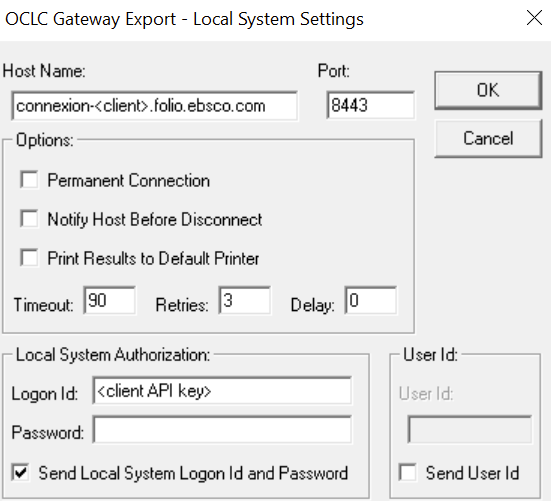
- In the OCLC Gateway Export - Local System Settings window, enter the following settings, then click OK (See screenshot, below).
- Host name: Member’s hostname in the format “connexion-[site ID].folio.ebsco.com” or IP address.
- Port: 8443
- Check the box for “Send Local System Logon Id and Password”
- Logon Id: Member’s API key. (Note that this is the API key to connect with the relevant FOLIO module, so treat it like any confidential password)
- Password: Leave this blank
- Contact the MCO Help Desk (help@mobiusconsortium.org for Host Name and Logon ID information.
- Name the export destination (e.g., “FOLIO”) and click OK
- Back on the Export tab of the Options screen, select the destination/profile that you want to use for exports (whether the newly created FOLIO one, your Sierra profile, or another one) and click Apply at the bottom of that window, then click Close
- When you export a record (via Action > Export, the ActionExport button in the toolbar, or F5), Connexion will use the gateway that was most recently selected
¶ Records Manager
While Connexion uses the edge API key, libraries will need to use the username and password of a FOLIO account to authenticate in Record Manager.
Here is what they should enter in the TCP/IP Export Preferences settings:
- Host Name: Institutional Connexion URL (from spreadsheet)
- Port Number: 8443
- Authentication: Login ID
- ID: Username of FOLIO account
- Password: Password of FOLIO account
Some additional notes:
Users can use their normal FOLIO account or, if they want visibility of which method was used for creating the record, a separate one dedicated to this use. The important thing is that the account has sufficient permissions to create Inventory records via Data import.
Ebsco Hosting will need to have on file the IP address they are using to connect, so please send those ranges for whitelisting before trying to connect. (This doesn’t need to be done again if they have already sent IPs for use with Connexion.)